¶ Hotel Content
¶ Name
The name of the Supplier or Hotel (preconfigured from Tourplan from the field "Creditors/Supplier Details/Mailing Address - 'Name'")
Note: Whenever possible, avoid using special characters such as ó, í, ñ since these may negatively affect hotel search later on.
The idea is to use the commercial name of the hotel, the one that appears on the hotel’s official website.
¶ Hotel Description
In Edit/Supplier/Content, enter the hotel description.
It may not exist and could appear empty, so you’ll need to add it.
Recommended: keep the description short, maximum of 3 sentences.
Objective: The purpose of the short description is to convey, in just a few words, all the hotel’s significant details (UPS – unique selling points) in a way that is appealing and engaging.
Details to mention could include, for example:
- Beautiful location (on a mountain with panoramic views, near significant landmarks, etc.)
- Range of entertainment options (rafting, jungle hikes, etc.)
Summary:
- Short, simple, and straight to the point with the hotel’s UPS
- Maximum 3 sentences
- Attractive, sales-oriented style but not exaggerated
- Do not list amenities, since these are shown below the description as icons.
There are two ways to enter Hotel Content in the DMS.
¶ How to Enter the Hotel Description
¶ The easiest way to add the Hotel description is directly from Baku
In the Hotels section
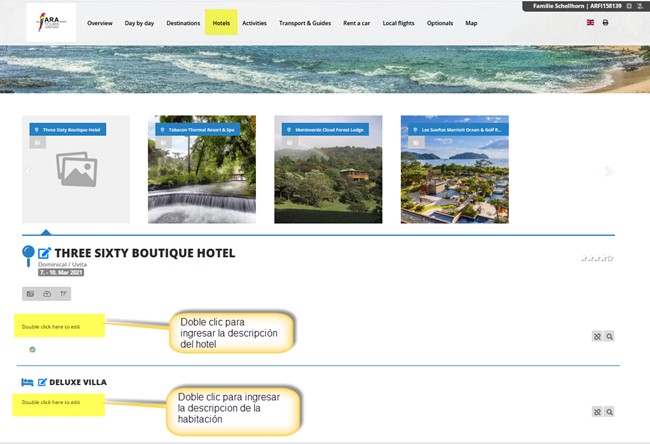
The system automatically sets Supplier and Text category = Baku Supplier Description default (with the key symbol), so you only need to worry about adding the description.
¶ Another way to add the Hotel description is from the Products section
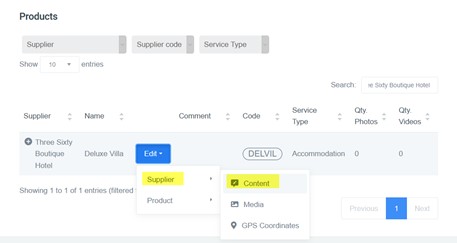
In DMS/Content/Products
Search for the supplier by name or code in the search bar.
Go to any service → Edit.
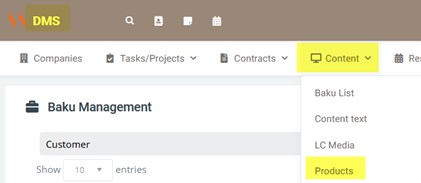
Click the button Edit/Supplier/Content.
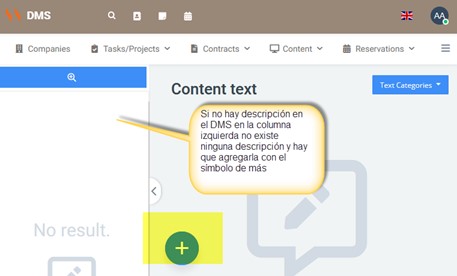
If the hotel is not in Latinconnect, it’s likely no description exists and you’ll need to add one by clicking the “+” symbol.
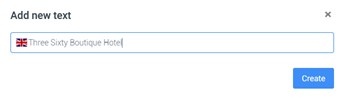
When clicking the “+” symbol, at minimum include the Supplier name, then click Create.
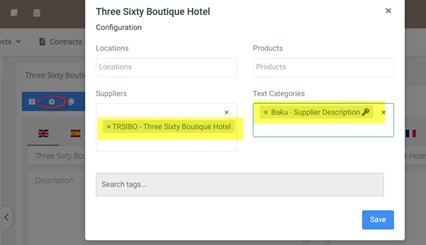
Ideally include it in all required languages, and always save in all languages. Always click the settings gear as well.
In settings, it is mandatory to include Supplier and Text category = Baku Supplier Description default (with the key symbol).
¶ Room Descriptions
The objective is to describe architecture, decoration, space, view, etc.
Do not list amenities here. Room amenities (hair dryer, safe, fridge, etc.) are added as icons separately.
Descriptions of different room types should always follow the same order and ideally contain the same details.
Include, when available (point 4 is mandatory):
- Bed type (Queen, King, Twin) – optional
- Size in m² – optional
- Location (first floor, etc.) – optional
- Description of architecture, decoration, space, view, etc. of the room – mandatory
- Minimum/maximum occupancy per room – optional
¶ How to Enter the Room Description
¶ The easiest way is directly from Baku
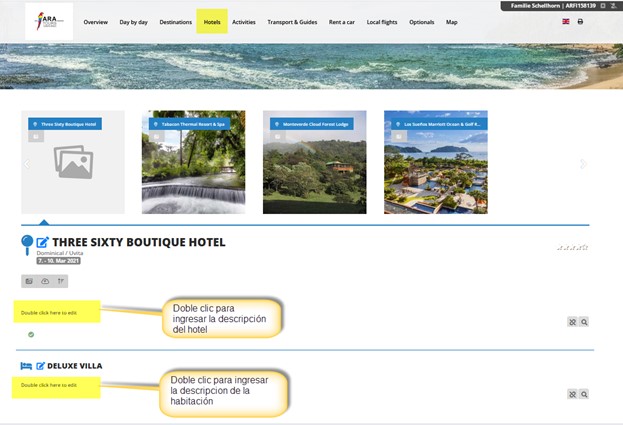
¶ Another way is from Products
In DMS/Content/Products, search for the supplier.
Go to the room → Edit.
Click Edit/Product/Content.
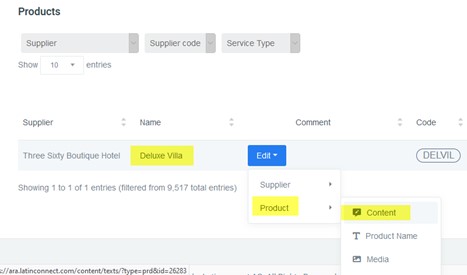
If the hotel (and thus the room) is not in Latinconnect, no description will exist and you’ll need to add one by clicking “+”.
When adding, include at least the Supplier name, then click Create.
For rooms: include Supplier name + room name (separated by spaces).
Example:
Three Sixty Boutique Hotel Deluxe Villa
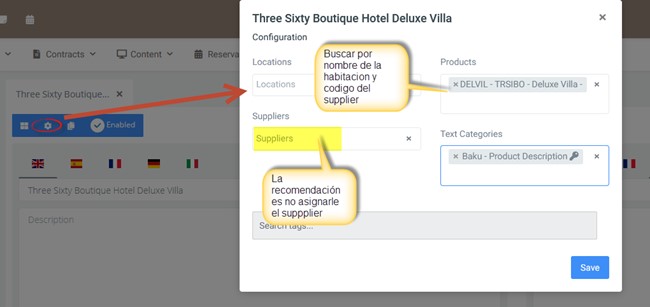
It is mandatory to include Product and Text category = Baku Product Description default (with the key symbol).
¶ Room Names
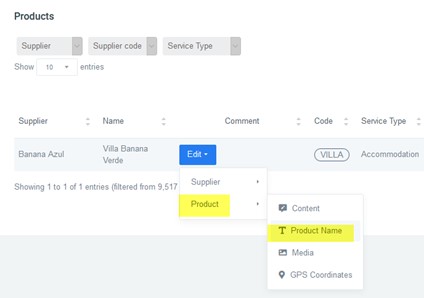
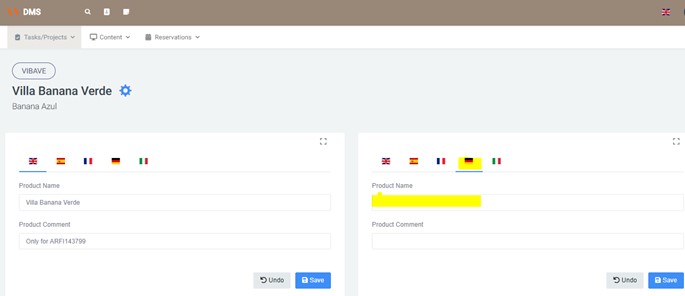
Under Edit → Product → Product Name, add the room name in other languages. Otherwise, the room won’t appear in other languages in Baku.