¶ How to Open a Ticket to Report a Problem or Submit an Enhancement Request for the DMS or Latinconnect?
¶ Where to Report?
Go to https://support.latinconnect.com/scp/login.php
using the same login credentials as Latinconnect. Initially, only users designated by each DMC are opened in the osticket system.
Open new ticket:

¶ Initial Configuration
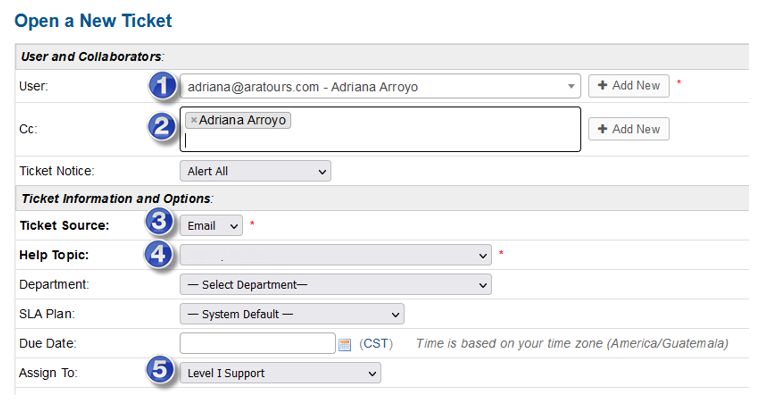
In point 2: You can copy me if you wish
In point 4: The Help Topic dropdown has the following options:
- Latinconnect / Feature Request = An enhancement request, some new functionality that you would like to see in the CAT or Latinconnect in general.
A selection process is followed once a year, usually through voting, and the 10 tickets with the most votes will be passed to management with the number of development hours that would need to be invested, and Latinconnect management is responsible for approving whether these tickets are developed or not. - Latinconnect / Fulfilment Request = When a simple change is required but no user has the permissions to make it, only the Development Department does.
- Latinconnect / Problem or Latinconnect / General Inquiry = When it is detected that some current functionality in the general DMS is failing.
- Latinconnect / Problem / Access Issue: When there is a login problem with Latinconnect.
- Latinconnect / Problem / CAT Problem = When it is detected that some current CAT functionality has a problem.
- Latinconnect / Problem / Content Text Issue = When there are problems with content from a supplier, product, label, etc.
- Latinconnect / Problem / Document Issue = When there is a problem with documents generated from Latinconnect, such as the Brochure or Manual.
- Latinconnect / Problem / Page -- Web Design Issue = A design error.
- Latinconnect / Problem / Picture Issue = Errors with photos.
- Latinconnect / Problem / Pricing Error Issue = Errors in the price table for a supplier or product.
- Latinconnect / Problem / Video Issue = Errors with a video.
In the Issue Summary: Indicate as clearly and concisely as possible what the ticket is about
And in the next box indicate Supplier, Tourplan Code
Service: if it concerns a specific service
Latinconnect ID or PID
The more details and even photos help.
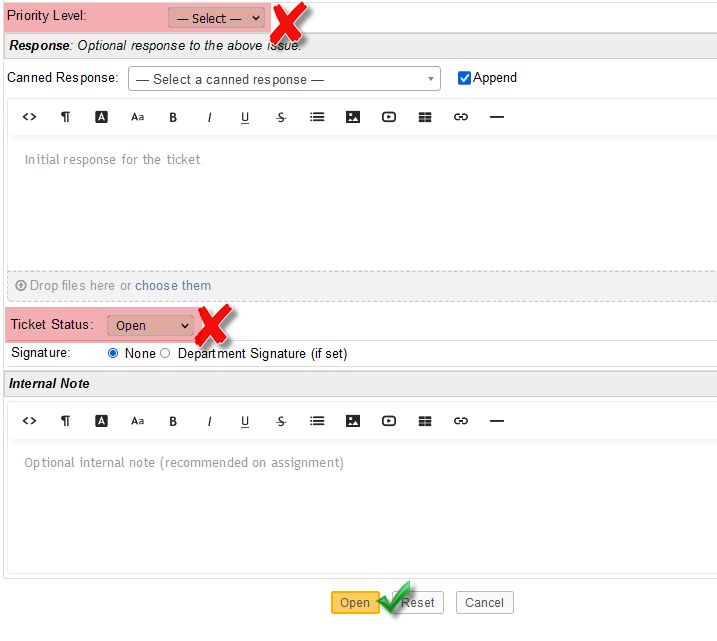
Do not modify the Priority or Ticket status area - the Development Department will prioritize the ticket according to the parameters explained in the following guide: Ticket Prioritization Guide
Finally, click on Open. An email will be sent to the Development team, the user who opened the ticket, and those copied.